For agencies and implementers
Your client needs a custom report. You shouldn't have to build a reporting system.
Keep the form, CRM and automations you already set up for them. Add Reportspace as the reporting layer: design the report visually, connect the data, and hand your client a workflow they can run and maintain themselves.
For form, CRM and no-code consultants who build reporting workflows for clients.
The request
"Can the report look like this?"
The data is already flowing. The client wants it turned into a branded, multi-page report with charts, scores and recommendations that depend on the answers. That usually leaves you with one of four options.
- 01
The form tool's own PDF
Quick to set up, and often right. It gets hard when the client wants a specific layout, particular charts or score-driven content.
- 02
Building each report by hand
Looks right, but someone repeats the work for every response, and the client depends on that person.
- 03
A chain of tools and workarounds
Charts from one place, a document template from another, glue in between. It works until one part changes.
- 04
Custom rendering code
Full control, plus a system you now host, maintain and explain to the client.
Reportspace is a fifth option: build the report in a visual editor, connect the data, and generate reports without maintaining a rendering system. It is not the right answer for every project, and the form tool's own PDF is often enough.
Where it sits
The reporting layer in a workflow you already run
Nothing upstream changes. Reportspace takes over from the point where the data exists.
- Your form or assessmentYour tool
- Your data sourceA sheet, a file, or the API
- ReportspaceDesign, rules, generation
- Client-ready PDFOne report, or a zip of many
- DeliveryYour email, CRM or portal
API, on request
Generate a report the moment a record arrives
Zapier, Make, n8n or your own code sends a web request with the report ID and one record's values, using an access token a workspace owner creates. The report is queued, and you get a private PDF link, valid for 24 hours, by checking back or through a callback.
This is a request you set up, not a listed app in those tools. The API generates the PDF; sending it to your client is a step in your own automation. Ask us for access details.
Through Google Sheets
Your existing tools feed the sheet
Many form, database and automation tools can write each record to a Google Sheet as a new row, and Reportspace reads that sheet. Examples include Airtable, Jotform, Typeform, GoHighLevel, Zapier, Make and n8n.
These are tools you already run. They are not Reportspace integrations, and you set up the connection to Google Sheets inside each tool.
Built in
What Reportspace does
- Connects to a live Google Sheet, read-only
- Takes an Excel or CSV upload. That is a snapshot: upload again when the data changes
- Reusable multi-page report templates
- Text, charts, tables and repeating sections bound to your data, across related sheets
- Conditional rules for colors, labels and text
- A PDF for one client
- A batch for many clients, downloaded as a zip
Delivery
You send the reports
Download the PDF or the zip and send it from the email, CRM or client portal you already use.
Not available yet: built-in email delivery, scheduled runs, and direct connections to form tools, CRMs or databases.
What you get
A reporting layer your client can keep running
- A visual editor the client can use
- Text changes and layout tweaks do not come back to you as tickets.
- Their existing design, reused
- Import the PDF they already send as the page background and place live data on top.
- Charts and conditional rules
- Scores drive charts, colors, status labels and which recommendation text appears.
- A brand per client
- Brand profiles let one template carry different logos, palettes and fonts, chosen by a column in the data.
- Team workspaces
- You and the client work in the same workspace, with roles.
- Batch generation
- A whole sheet becomes one report per row, downloaded as a zip.
- API access on request
- Trigger a report from the automation you already built.
- No rendering code to maintain
- Fonts, page layout, charts and PDF output are Reportspace's job, not yours.
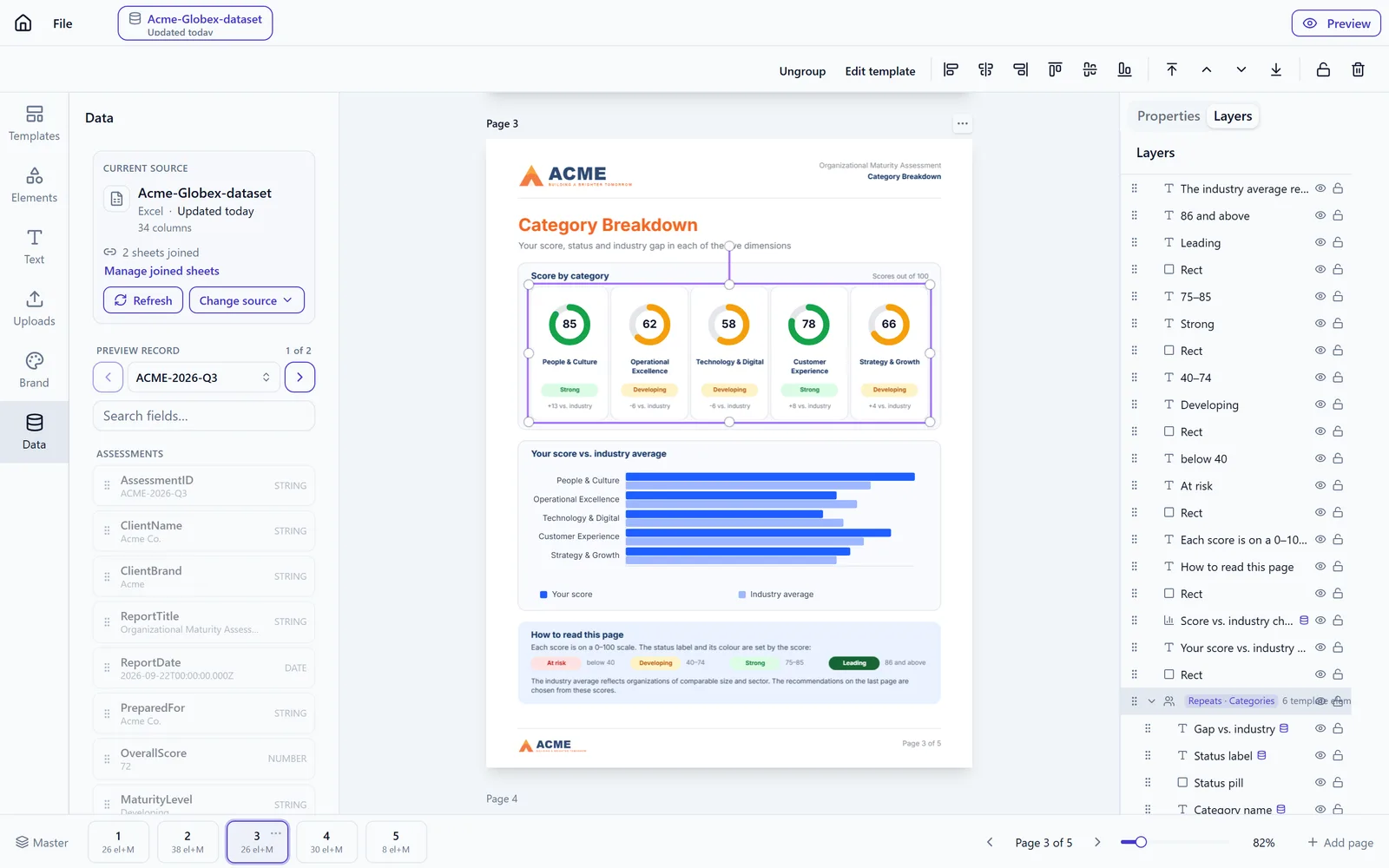
Worked example
A form-based assessment, end to end
A client runs a scored assessment through a form and wants every respondent to receive a branded report.
- 1The form platformCollects the responses and calculates the scores.
- 2Google SheetsReceives each response as a new row, written by the form tool's own Google Sheets connection.
- 3ReportspaceReads the sheet and generates the branded report for each row: charts, status colors and the recommendations chosen by the client's rules.
- 4DeliveryThe client downloads the PDF or zip and sends it, or your automation sends it.
The same example, triggered through the API
When the report should be produced as soon as a response arrives, your automation calls the API instead of waiting for someone to export.
- A workspace owner creates an access token.
- Your automation sends a request with the report ID and that respondent's values.
- The request is accepted and the report is queued for rendering.
- You check back, or receive a callback, and get a private PDF link that is valid for 24 hours.
- Your automation attaches or links the PDF in the email or CRM step you already have.
The API produces the PDF. It does not email or deliver it. API access is available on request; we send the endpoint details when you ask.
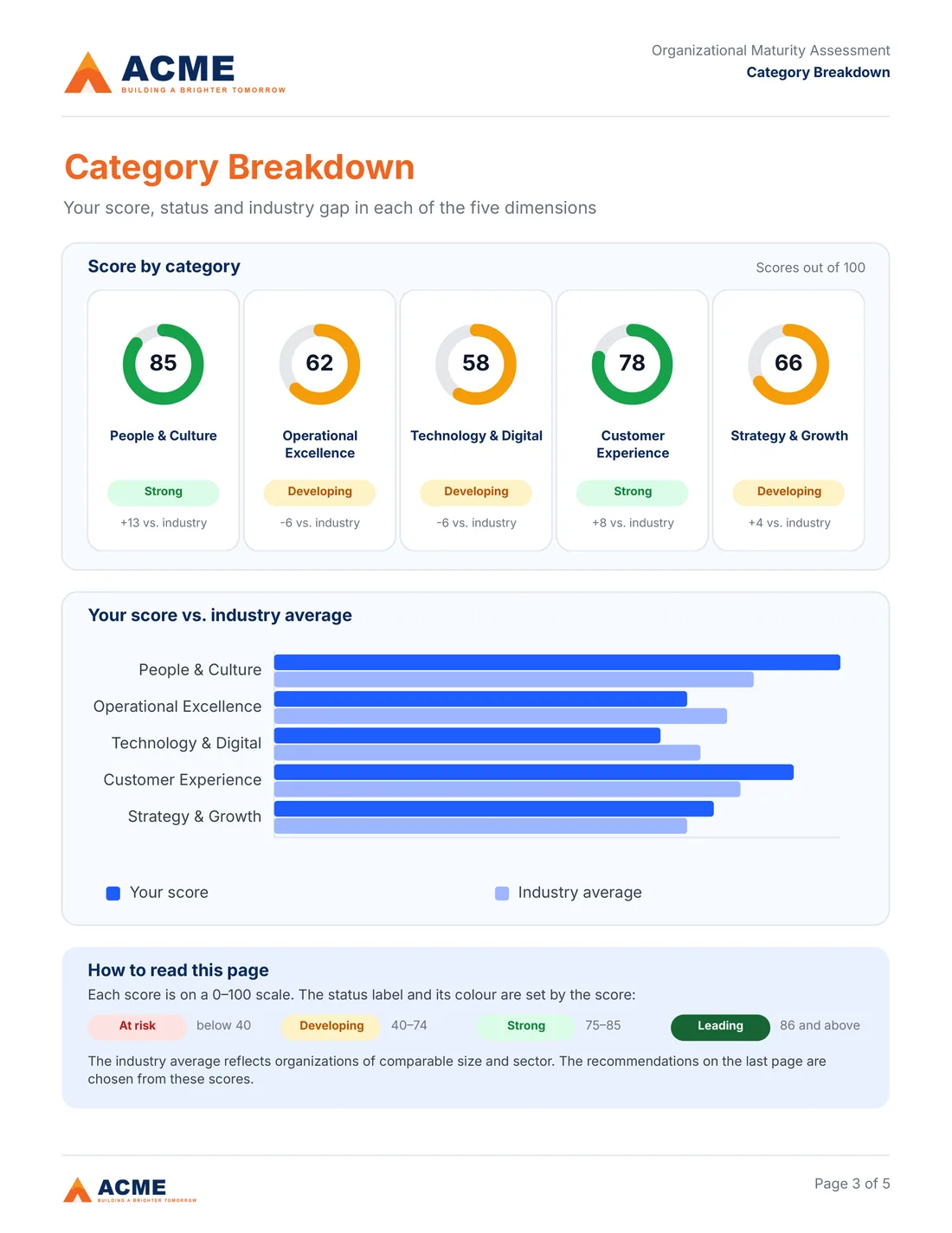
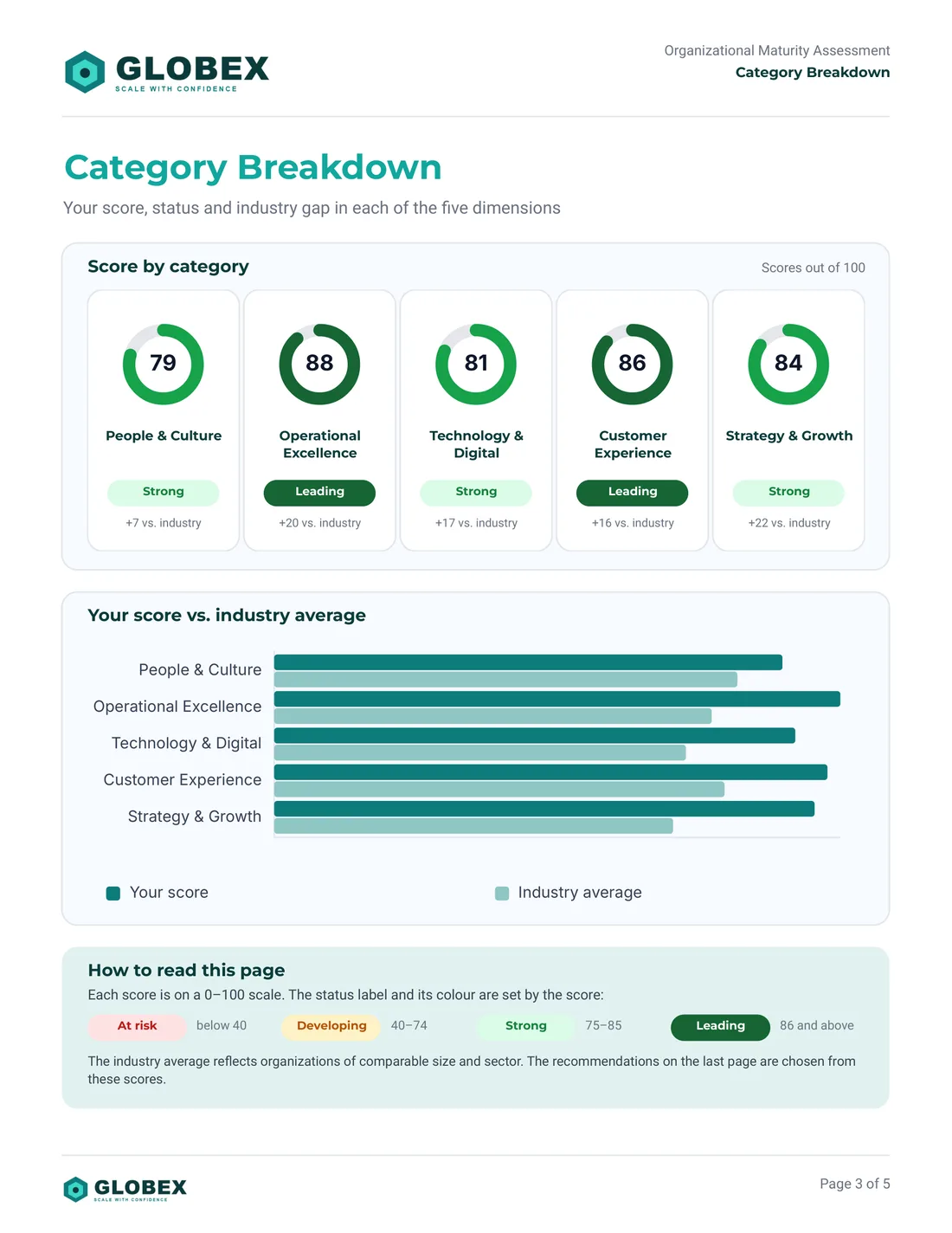
What the output looks like
Two reports generated from one template with different client data and brand profiles.
Founder-led offer
Looking for 10 design partners.
Have an assessment report you currently build by hand? We'll help convert one qualifying report into a reusable Reportspace template at no charge.
What the free setup covers
- One report of up to 5 pages
- Based on a report design you already have
- Built with sample data you supply
- Subject to a short qualification and scope review
Custom integrations and bespoke product development are not part of the offer.